Modal Form – Daily Note Journal Template (FREE)
- September 29, 2025
📝 Overview
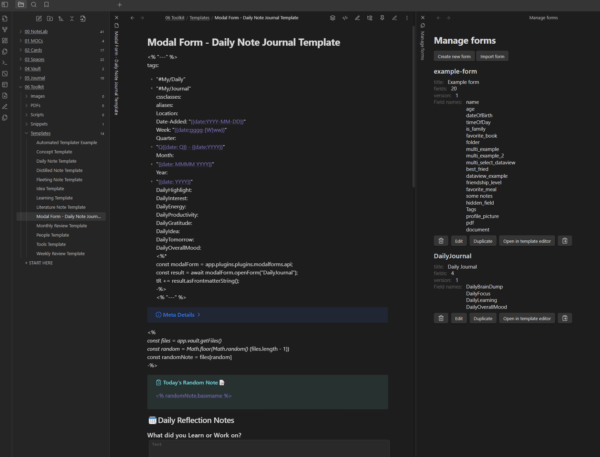
A Daily Note Template using a Modal Form for you to enter your most important notes for the day.
We use the Modal Forms Community Plugin in order to achieve this.
Please watch the video for more details on how this works.
📦 What's Included
- 📄 Import-Daily-Modal-Form-JSONData.txt The JSON file that is imported into the Modal Forms Community Plugin to save you time
-
📄
Modal Form - Daily Note Journal Template.md
The Daily Note Journal Template for Obsidian
Place this into your Templates Folder
🛠️ Installation Steps
- Extract the Contents of the ZIP File "Modal-Daily-Note-Template.zip"
- Add the "Modal Form - Daily Note Journal Template.md" to your Template Directory Folder
- Install Community Plugins Dataview, Templater, Periodic Notes, Calendar and Modal Forms.
- Set your Periodic Daily Note Setting or Daily Note Settings depending on what you're using.
- Open "Import-Daily-Modal-Form-Data.txt" and Select All the Text then Copy that JSON data
- In Obsidina, CTRL+P > Select Modal Forms: Manage Forms
- Select Import Form, Paste the JSON data you copied, then select the import button
-
This is optional but you can also trigger this with QuickAdd Template Choice
- File Name Format = {{DATE:DD-MM-YY}}
- Choose your Daily Journal Folder as Location
- Open Note once created
⚙️ Requirements
- Obsidian
- Modal Forms Community Plugin
- Modal Forms Template
- Daily Notes Community Plugin (optional)
- Calendar Community Plugin (optional)
Related Products
Obsidian CSV Import Starter Pack (50 Books + AI Prompt)
Free +
Rated 0 out of 5
Obsidian YouTube Video Note Template (FREE)
Free +
Rated 0 out of 5
Obsidian Tag Taxonomy
Free +
Rated 0 out of 5
Obsidian Web Clipper Templates
$2.00
Rated 0 out of 5
Reviews
{{ reviewsTotal }}{{ options.labels.singularReviewCountLabel }}
{{ reviewsTotal }}{{ options.labels.pluralReviewCountLabel }}
{{ options.labels.noReviewsLabel }}
{{ options.labels.newReviewButton }}
{{ userData.canReview.message }}